Release evidence, not just green checks
SDODS runs BDD tests for UI and API flows and keeps the proof: a screenshot before and after every step, the requests behind it, and the history of every run. Anyone on the team can look at a release and say yes.
Free under the Apache-2.0 license.
Successful login shows the products
auth/login.feature, passed
- 1
Given I am on the login page - 2
When I login with "standard_user" and "{{standardPassword}}" - 3
Then I should be on the inventory page - 4
And the inventory title should be "Products"
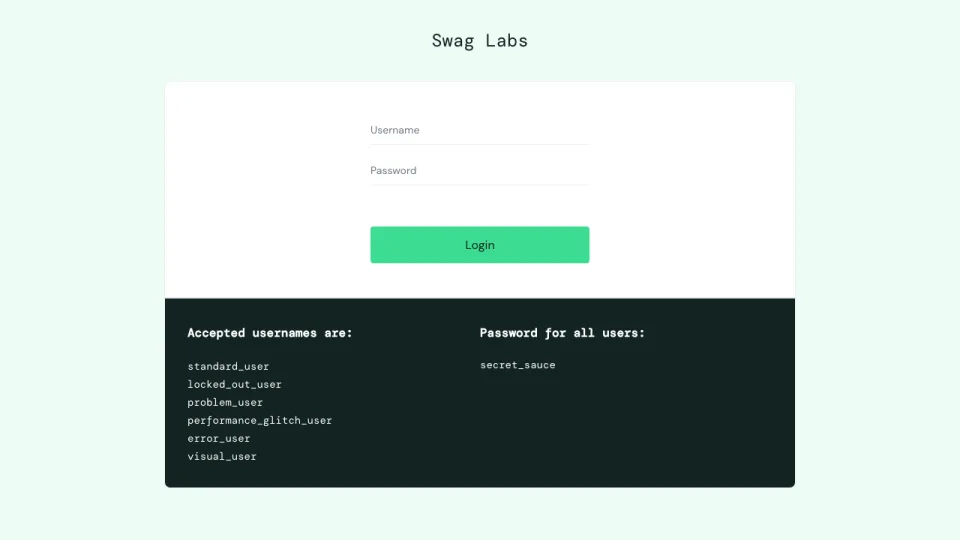
Before step 2
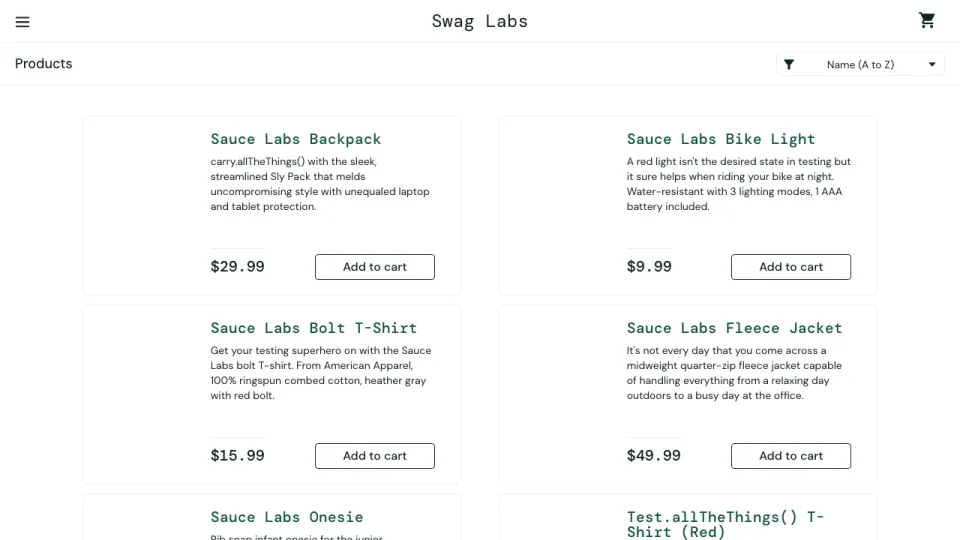
After step 2
What a run leaves behind
A green pipeline says the tests finished. The run page says what they did: which scenario failed and why, which ones only passed on a retry, and what changed in the page objects along the way. This is a real nightly run of the demo project.
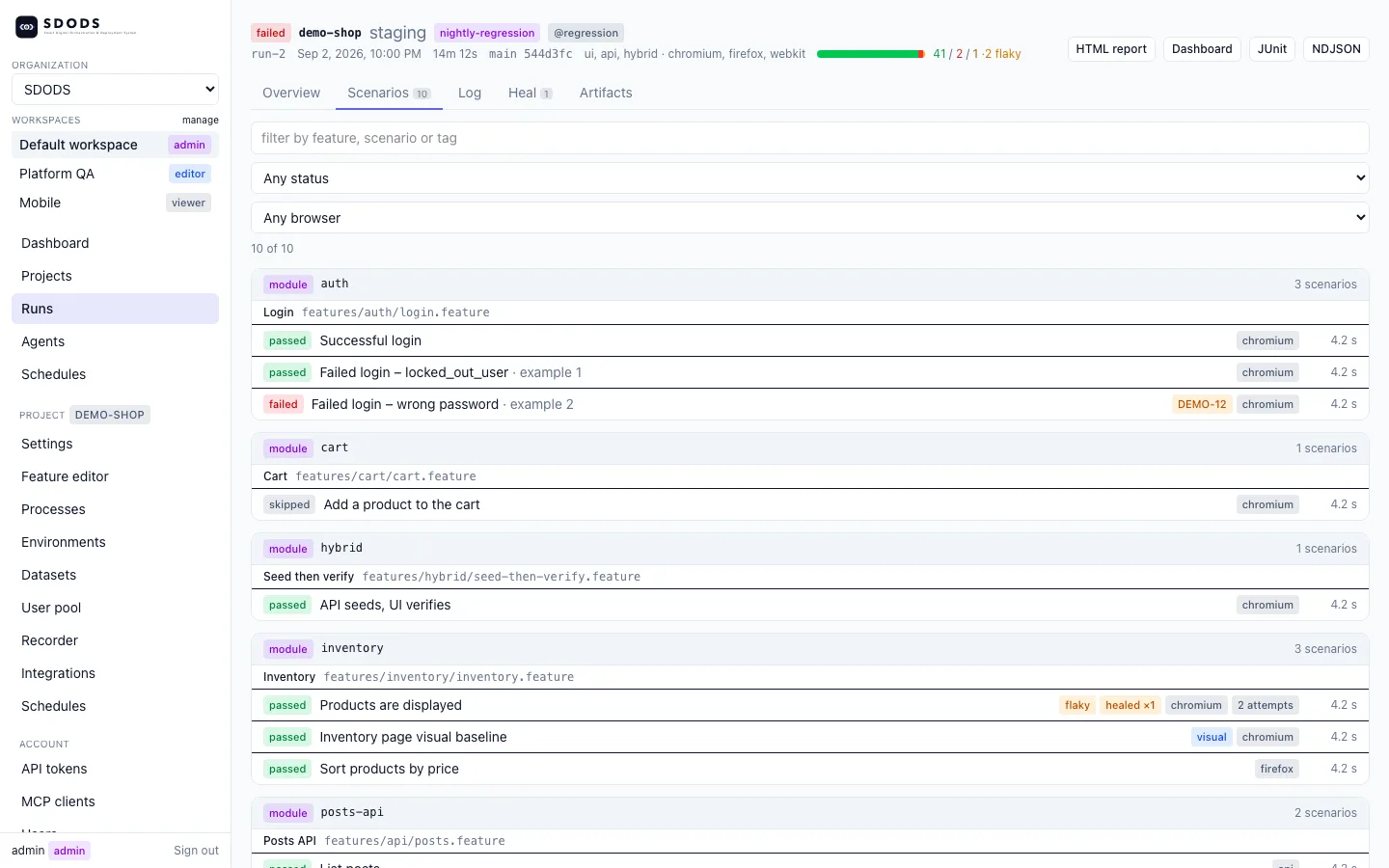
- Failures point at a ticket
- The wrong-password example failed, and its @jira tag links it to DEMO-12.
- Flaky and healed are named
- "Products are displayed" passed on its second attempt, after one locator was healed.
- Organised like the code
- Scenarios are grouped by module and feature file, with the browser and time of each.
- Exports for other tools
- The same run as an HTML report, JUnit XML or NDJSON events.
Open the step timeline, API panels and pixel diffs in the demo.
Three layers, one line through them
A test suite answers two questions: what should the product do, and did it do it this time. SDODS keeps those answers in separate layers and ties them together one step at a time, so any line in a feature file leads to the code that ran it and the screenshots it left.
- Feature files, the agreement
- Scenarios in Gherkin that product, QA and engineering can all read. Tags say whether each one is UI, API or hybrid, and which suite runs it.
- Steps and page objects, the binding
- Every line of a scenario matches one step definition. Steps are shared across features, and page objects hold the locators, so a UI change is fixed in one place.
- Evidence and history, the record
- Running a step leaves proof: screenshots either side of it, the requests it made, and a result that joins every earlier run of the same scenario.
What ships in the box
Write the tests
- UI, API and hybrid in one language
- Gherkin with one merged fixture set, so a scenario can seed data through the API and check the result in the browser.
- Data and user pools
- CSV, JSON, YAML, database tables and faker factories per environment. Each worker leases its own account and reuses its login state.
- MCP server and agents
- 86 tools for Claude Code, Codex, Cursor, VS Code, Gemini CLI and any MCP client, plus planner, generator, healer and upgrader agents.
Run them anywhere
- Many apps, many environments
- One YAML file per project and one per environment, with a precedence you can explain. Secrets only ever arrive through ${VAR}.
- Every browser you ship to
- Chromium, Edge, Firefox, WebKit and mobile emulation. --project-matrix runs them all, and lint checks every @skip:<browser>.
- CI, GitHub and Jira
- Check runs, PR comments, deduplicated issues and @jira:KEY links. Schedule runs from the server, crontab, systemd or Actions.
Keep the proof
- Before and after every step
- A screenshot either side of each UI step, request and response snapshots for API steps, and visual baselines chosen per suite tag.
- Locators that heal
- When a locator breaks, SDODS scores candidate replacements, records what it chose and proposes the fix to the page object.
- Run history that remembers
- Results in SQLite or Postgres show flaky scenarios, fragile locators, unstable environments and suite health over time.
How it works
Everything starts from the command line. The web UI, the MCP server and the scheduler run the same commands and stream their output, so CI needs nothing but Node and the repository.
sdods CLI
You, CI or the scheduler start a run.
Config and registry
Project and environment YAML resolve; steps load.
Browser and API runs
Playwright drives each scenario.
Evidence
NDJSON events and screenshots are written.
History
Results land in SQLite or Postgres.
Review
The web UI, MCP server and agents read it back.
Your first run
Three commands from nothing to a run you can open. The demo project tests a public shop, so you do not need an app of your own yet.
Other package managers, upgrades and uninstalling are on the install page.
- 1
Install the CLI
On macOS, Linux or Windows. Node 22 is the only requirement.
curl -fsSL https://sdods.com/install.sh | shirm https://sdods.com/install.ps1 | iex - 2
Create a workspace
sdods initwrites a workspace with the demo project in it.sdods init ~/my-tests && cd ~/my-tests - 3
Run the API and UI suites
Then
sdods serve --openshows the run page from above.sdods run -p demo-shop -e staging -l api sdods run -p demo-shop -e staging -l ui -b chromium -t @smoke
Works with your AI coding tools
Claude Code, Codex, Cursor, VS Code, Gemini CLI, Windsurf and any MCP client. Install the plugin or the skills, then ask your assistant to plan, write, run, heal or review tests. Agents reuse your logged-in CLI session, so no API key is required.
A team can also share one SDODS server and connect every assistant to its /mcp endpoint with a scoped token. The AI coding tools guide covers each client.
Using an AI coding agent? Install SDODS:
Install the SDODS plugin in Claude Code: skills, subagents, commands and the MCP server.
/plugin marketplace add https://sdods.com/skills.git/plugin install sdods@sdods
Missing something you need?
Feature requests and feedback go straight to the maintainers by email. You do not need an account with us.
Send feedback