How do people keep real passwords out of a users.csv that has to be committed?
Example threads. These questions and answers were written by the SDODS team to document real problems and how to fix them. The people named are illustrative, not real users. Questions asked on this site are marked new.
Our pool CSV has a plaintext password column and security review flagged it, fairly. Options I can see are all bad:
gitignore the file, and every new joiner spends an afternoon working out why nothing runs
one shared password nobody minds leaking, which is a lie we will forget we told
generate the file in CI, and lose the ability to run anything locally
The file stays committed, reviewable and diffable, and the actual secret comes from .env, .env.<env> in the repo root or the project directory, or from the real environment in CI.
The :-default form is worth using deliberately. For a public sandbox the default is the demo credential and the file works out of the box. For a real environment, leave the default off so an unset variable is loud rather than wrong.
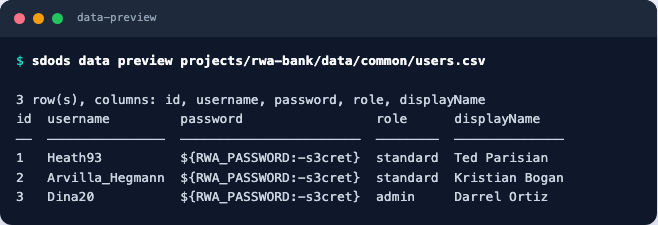
sdods data preview shows you the file, not the resolved row, so what you see is the placeholder:
sdods data preview reads the file, so the placeholder is what is on screen
The same rule is enforced in the yaml — a key that looks like a secret with a literal value is a CONFIG_SECRET_LITERAL error, so env.vars.standardPassword: hunter2 will not resolve at all. The data files are the one place you can still do the wrong thing by hand, so review for it.
What we settled on, if it helps: the committed CSV carries only ids, usernames, roles and display names, and every password cell is the same ${QA_ACCOUNT_PASSWORD} reference. The accounts are provisioned by a seeding script that sets them all to that one value in the test environment.
It means the CSV tells you nothing an attacker wants and still runs unchanged on any machine that has the variable.