analyze gave me modules called deploy, execute and status instead of workflows
Example threads. These questions and answers were written by the SDODS team to document real problems and how to fix them. The people named are illustrative, not real users. Questions asked on this site are marked new.
Thirty modules on the proposal and twelve of them are verbs: status, delete, export, send, run, update, upload, download, stats, validate, versions, introspect.
Both of those should obviously be workflows. Modules are what -m filters on and what the features get organised under, so I do not want to accept this. Is there a setting?
When the route file's own basename is generic — route.ts, index.ts — module naming walks up the directory tree and stops at the first directory whose name is not generic. In a REST-shaped App Router tree the first such directory going up is the action segment, not the resource. Hence deploy and execute as module names. There is an open issue; it is not fixed.
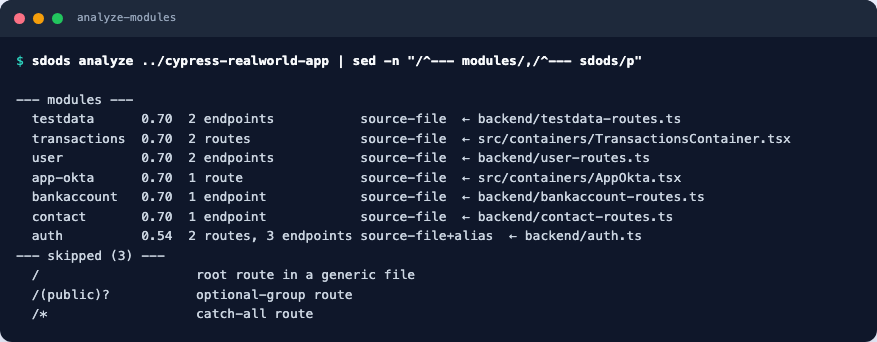
What you can do today is read the module table before applying, because it tells you enough to spot every bad row:
The module table prints the signal and source file that named each module
The source-file signal at 0.70 is the one this bug lives in. Sort your eye down that column: any module whose source file sits under an action segment (.../<resource>/[id]/<verb>/route.ts) is misnamed, and the correct name is the resource directory a level or two above it.
Then edit modules: in the proposal before --apply, or in projects/<slug>/sdods.project.yaml straight after. Doing it early is much cheaper than doing it later, because the module name is also the feature directory.
Second-order annoyance worth mentioning: the verb modules also inflate the count, so the proposal looks like it discovered more structure than it did. We came out with 30 modules for what is genuinely about 14 domains, and -m filtering was useless until we merged them by hand.
Merging is fine — you rename several entries to the same module and the routes collect under it. Just budget an hour for it on a large app, and do it before anyone writes a feature.