One scenario fails about one run in twenty — what do I do with it?
Example threads. These questions and answers were written by the SDODS team to document real problems and how to fix them. The people named are illustrative, not real users. Questions asked on this site are marked new.
We have a checkout scenario that fails maybe one run in twenty. Different step each time, usually a timeout. Rerunning is always green, so nobody has ever debugged it, and by now people hit retry on the pipeline without even reading the failure. That habit is going to hide a real bug eventually.
What is the actual routine here? I do not want to delete the scenario and I do not want to keep rerunning it.
Then classify it, because "flaky" is three different bugs wearing one word:
heal events in the run point at locator drift: the page changed and the selector was rescued
API snapshots with a 5xx or a timeout point at the environment, not at your test
before/after screenshots that are identical except one is a step behind point at a timing race
The run viewer puts all three on one page, so open the failing attempt rather than the log. For checkout the timing race is the usual answer, and it is usually a step asserting on the thing it just clicked instead of on the thing that follows.
To reproduce on demand instead of waiting for CI:
bash
sdods run -p demo-shop -e staging --scenario "Checkout with a saved card" --repeat-each 20 --fail-on-flaky
--fail-on-flaky exits 1 if any test is flaky, so the same command is the proof at the end that you fixed it. Twenty repeats of one scenario is a couple of minutes; the argument about whether it is fixed lasts longer.
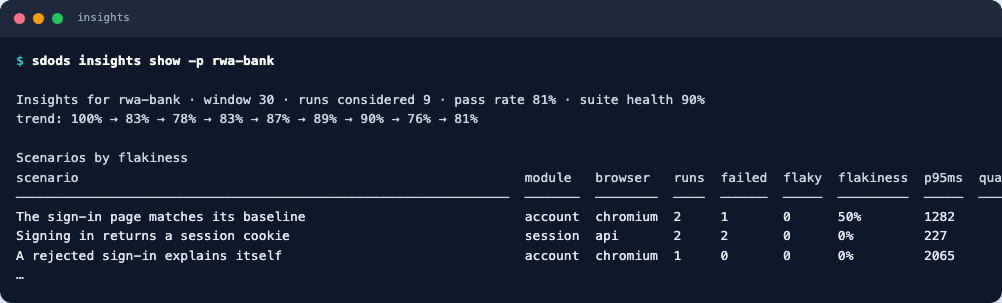
insights show ranks scenarios by flakiness over the window
Flakiness per scenario is passes-on-retry plus outcome flips over runs in the window, and the quarantine threshold is 0.2 with at least 10 runs. One in twenty is 0.05, so yours will sit near the top of the table without being flagged — which is the honest answer: it is real, and it is not yet bad enough for the tool to act on by itself.
On the retry habit specifically: quarantine is the tool for that, and it is a holding pen, not a fix.
A quarantined scenario keeps running and keeps reporting; it just stops blocking the gate, and its status stays on the dashboard until somebody lifts it. Toggle it in the UI, or with insights quarantine <fingerprint>.
The point is that the gate becomes honest again the same afternoon, so the next red build is a real one and people stop reflexively retrying. Put a name and a date on every quarantine when you open it — a quarantine with no owner is how you end up with a suite that is 30% quarantined and 0% trusted.
Slightly sideways, but look at the p95 duration column in the insights output before you go hunting for a race. Ours "failed one run in twenty" and the real story was that it finished just under the test timeout every single time; any load on the agent pushed it over. Nothing in the test was flaky at all — it was a slow endpoint that had been getting slower for months.